

Learn how to build a wake surf booking system with SMS notifications, automated scheduling, waitlist management, and calendar invites using Motia and Twilio
Every Tuesday at 7am, I go wake surfing with friends. The problem? I had to text everyone manually: "You coming Tuesday?" Then wait for replies. Half wouldn't respond. Someone would cancel Sunday night. I'd be texting backups Monday trying to fill the spot.
I needed something automated:
- Text everyone on Monday asking who's in
- Take the first 3 YES replies
- Put extras on a waitlist
- Send reminders Tuesday morning so nobody oversleeps
- Let me manage everything without editing code
So I built it with Twilio for SMS and Motia for the backend workflows. Motia handles the event-driven logic—when someone books, it triggers SMS confirmations, calendar generation, and waitlist checks automatically.
Now every Monday at 3pm, the system texts everyone automatically. When they reply, it books them or adds them to the waitlist. Tuesday morning at 5:30am, confirmed people get a reminder with the roster and location. I don't touch anything.
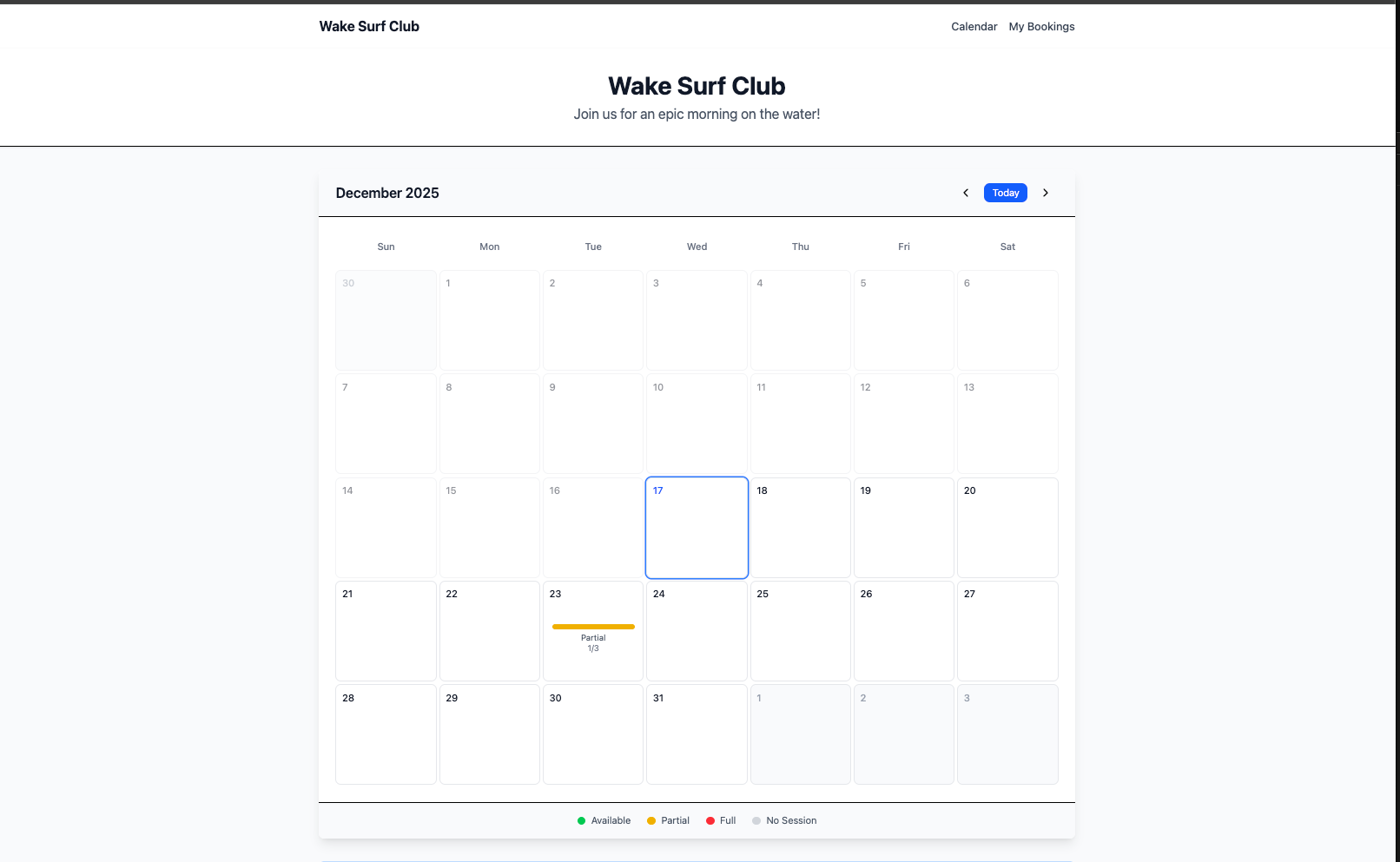
There's also a web calendar where people can book directly, see who's coming, and cancel their spot (up to 12 hours before). If someone cancels, the first person on the waitlist automatically gets promoted and receives a text.
This tutorial shows you how to build the same thing: automated SMS invites with Twilio, event-driven booking logic that handles confirmations and waitlist promotion, cron jobs for scheduled invites and reminders, an admin panel to manage everything, a public calendar interface, and state management for sessions/friends/bookings.
What You'll Build
A booking system for weekly wake surf sessions that handles everything automatically:
For Users:
- Calendar interface showing available sessions, capacity, and current roster
- Direct booking via web (no SMS required)
- SMS confirmations with calendar invite (ICS file) and cancellation link
- Automatic waitlist if session is full
- Cancel bookings up to 12 hours before session starts
For Admins:
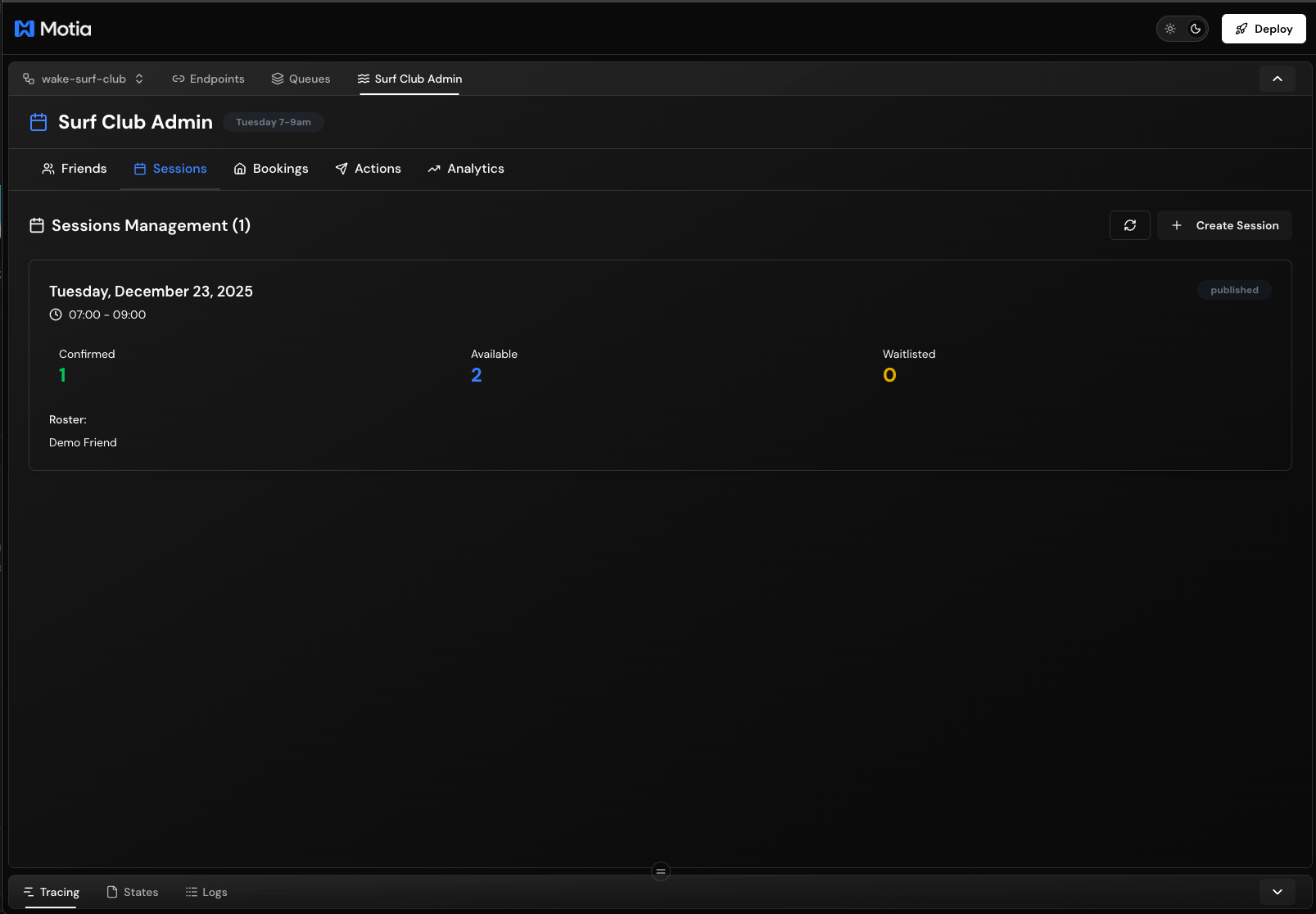
- Workbench panel to manage sessions, friends, and bookings
- Bulk import friends from CSV
- Manual invite triggers
- Session creation with capacity limits
- Real-time booking status and roster view
Automated Workflows:
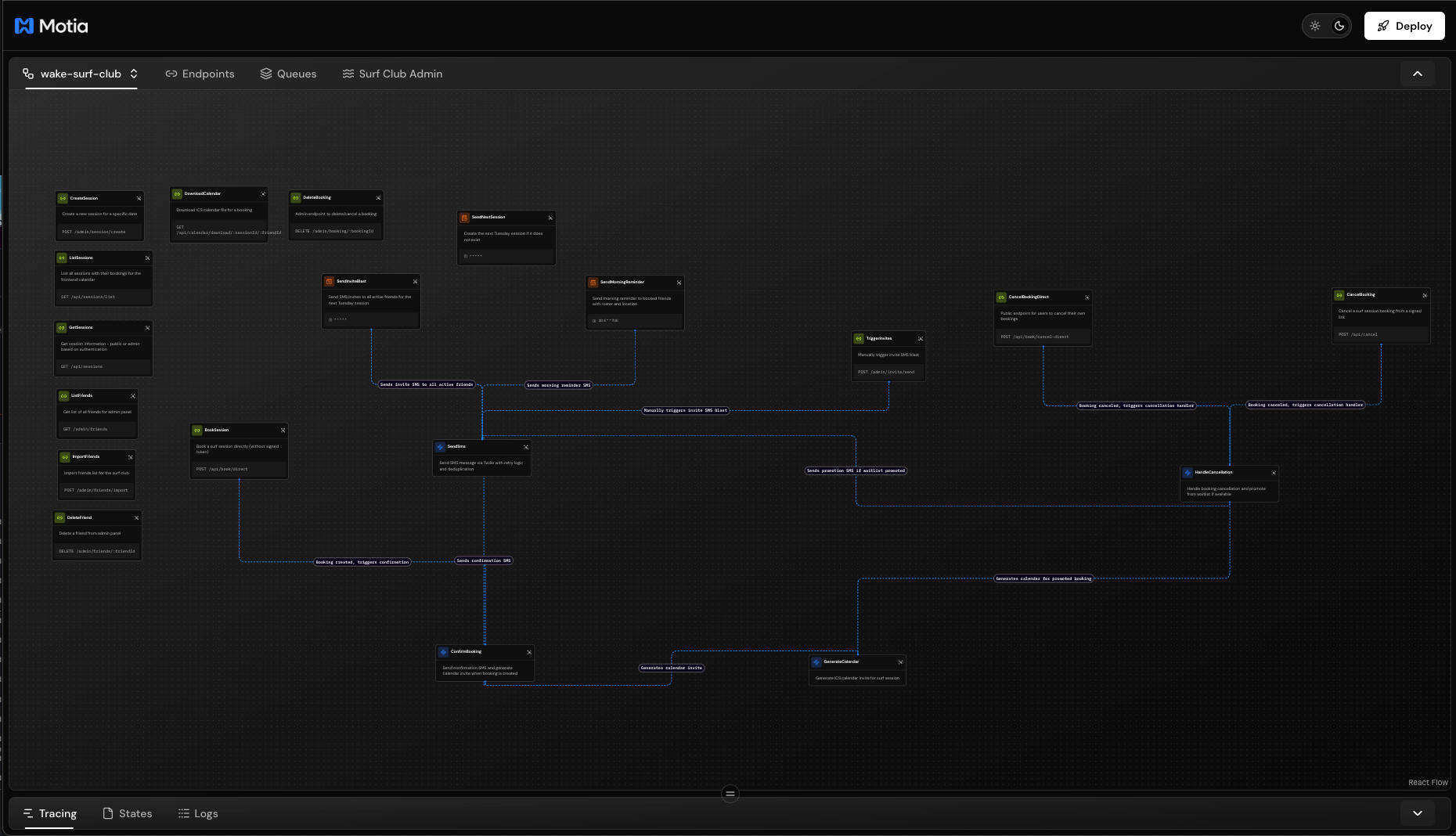
- Monday 3pm: SMS invite blast to all active friends for next Tuesday
- Tuesday 5:30am: Morning reminders to confirmed bookings with roster and location
- Friday 12pm: Creates next Tuesday's session automatically
- On booking: Sends SMS confirmation with calendar invite
- On cancellation: Promotes first waitlisted person and sends notification
Prerequisites
Before starting, you'll need:
Required:
- Node.js 18 or higher
- Twilio account (sign up for free trial)
- Account SID
- Auth Token
- Phone number (Twilio provides one for free)
- OpenSSL or similar tool to generate JWT secret
Twilio Setup:
- Create account at twilio.com/try-twilio
- Go to Console → Account Info
- Copy your Account SID and Auth Token
- Go to Phone Numbers → Get a number (free with trial)
- Copy your Twilio phone number
Generate JWT Secret:
openssl rand -base64 32
Save these values, you'll need them in the next step.
Getting Started
Clone and Install
# Clone the repository
git clone https://github.com/MotiaDev/motia-examples
cd motia-examples/examples/advanced-use-cases/wake-surf-club

# Install dependencies
npm install
Configure Environment Variables
Create a .env file in the project root:
# Twilio SMS Configuration
TWILIO_ACCOUNT_SID=ACxxxxxxxxxxxxxxxxxxxxxxxxxxxxx
TWILIO_AUTH_TOKEN=your_auth_token_here
TWILIO_FROM_NUMBER=+15551234567

# App Configuration
PUBLIC_APP_URL=http://localhost:3000
HOST_SIGNING_SECRET=your_generated_secret_here
Replace the placeholder values:
TWILIO_ACCOUNT_SID: From Twilio Console → Account InfoTWILIO_AUTH_TOKEN: From Twilio Console → Account InfoTWILIO_FROM_NUMBER: Your Twilio phone number (include +1)HOST_SIGNING_SECRET: Output fromopenssl rand -base64 32
Start the Development Server
npm run dev
This starts:
- Motia backend at
http://localhost:3000 - Workbench UI at
http://localhost:3000 - API endpoints at
http://localhost:3000/api/*
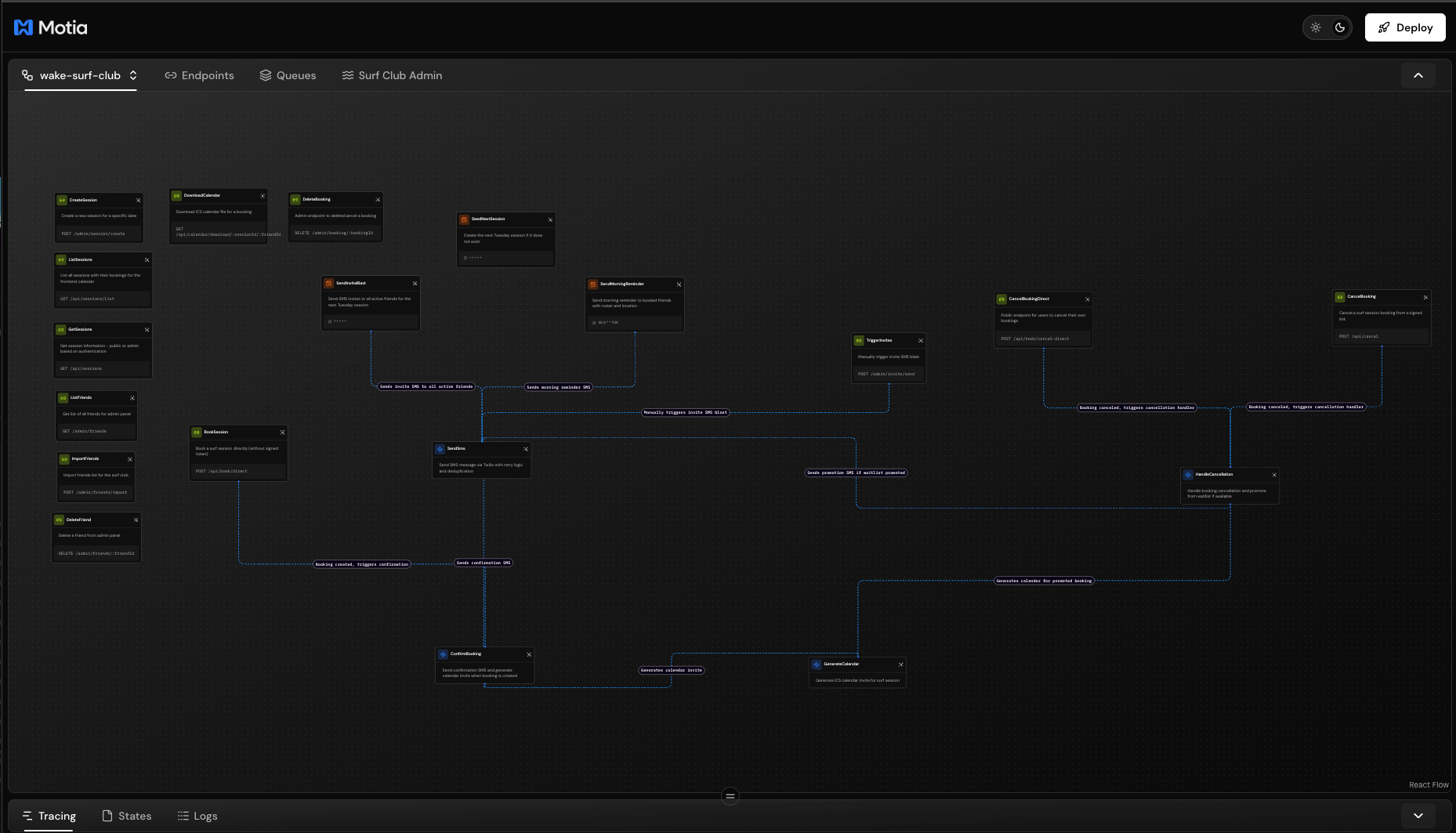
Open http://localhost:3000 in your browser. You'll see the Motia Workbench with a "Surf Club Admin" tab in the navigation.
Start the Frontend (Optional)
The frontend is a separate React app for the public calendar interface:
cd frontend
npm install
npm run dev
This starts the calendar UI at http://localhost:5173. It proxies API requests to the backend on port 3000.
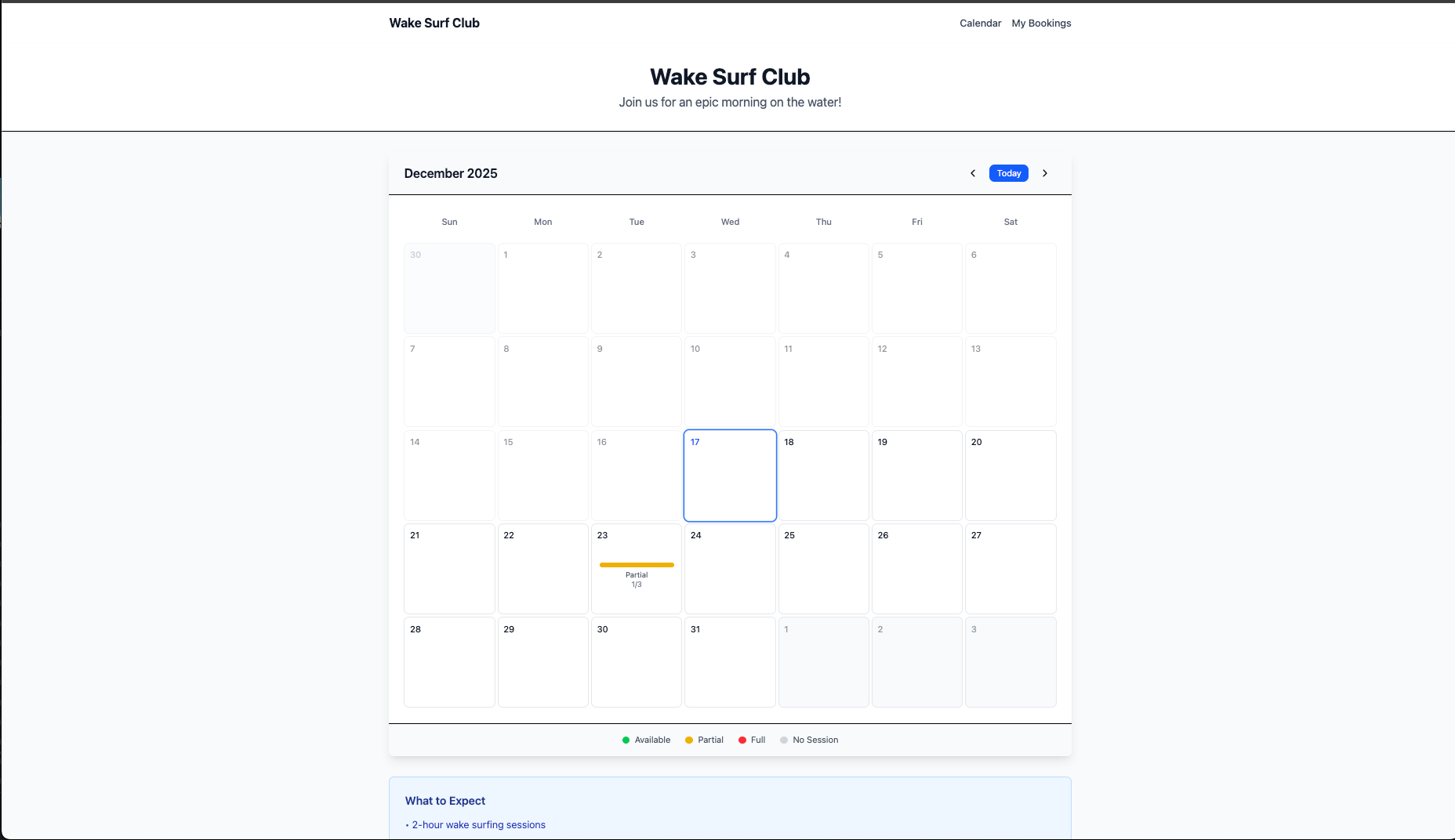
Note: The backend works without the frontend. You can manage everything through the admin panel and API endpoints.
Your development environment is ready. Next, we'll explore how the system works.
Project Structure
The codebase is organized by workflow type:
wake-surf-club/
├── steps/                    # Motia workflow steps
│   ├── api/                 # HTTP endpoints
│   │   ├── public/         # User-facing (booking, calendar)
│   │   └── admin/          # Admin-only (session creation, friends)
│   ├── events/             # Event-driven handlers
│   │   ├── confirm-booking.step.ts
│   │   ├── generate-calendar.step.ts
│   │   ├── handle-cancellation.step.ts
│   │   └── send-sms.step.ts
│   └── cron/               # Scheduled jobs
│       ├── seed-next-session.step.ts
│       ├── send-invite-blast.step.ts
│       └── send-morning-reminder.step.ts
├── src/types/              # Shared data models
│   ├── models.ts           # Zod schemas (Friend, Session, Booking)
│   └── utils.ts            # Helper functions (JWT, phone formatting)
├── plugins/                # Custom Workbench extensions
│   └── surf-admin/         # Admin panel UI
└── frontend/               # React calendar app
    ├── src/components/
    └── src/utils/
Step Types:
api- HTTP endpoints that respond to requestsevent- Background handlers triggered by eventscron- Scheduled tasks that run at specific times
Key Directories:
steps/api/public/- Endpoints anyone can call (booking, sessions list)steps/api/admin/- Endpoints for managing the systemsteps/events/- Handlers for booking confirmations, SMS, cancellationssteps/cron/- Automated weekly taskssrc/types/- Data models and utilities shared across stepsplugins/surf-admin/- Custom admin UI that appears in Workbenchfrontend/- Optional React calendar interface
Data Models
The system uses three core models with Zod validation:
Friend
{
  id: string              // UUID
  name: string            // "Alice Smith"
  phoneE164: string       // "+15551234567"
  active: boolean         // Receives invites if true
  createdAt: string       // ISO timestamp
}
Friends are people who can book sessions. The active flag controls who receives Monday invite blasts.
Session
{
  id: string              // UUID
  date: string            // "2025-12-24" (YYYY-MM-DD)
  startTime: string       // "07:00" (HH:MM)
  endTime: string         // "09:00" (HH:MM)
  capacity: number        // 3 (max participants)
  status: string          // "draft" | "published" | "closed"
  location: string | null // "Main Lake Dock"
  createdAt: string       // ISO timestamp
}
Sessions represent weekly surf sessions. Only published sessions accept bookings.
Booking
{
  id: string              // UUID
  sessionId: string       // References Session.id
  friendId: string        // References Friend.id
  phoneE164: string       // Denormalized for fast lookup
  status: string          // "confirmed" | "waitlisted" | "canceled"
  createdAt: string       // ISO timestamp
  canceledAt?: string     // ISO timestamp (if canceled)
}
Bookings link friends to sessions. Status determines if they're confirmed, waitlisted, or canceled.
State Storage Pattern:
Each model is stored three ways for fast lookups:
// Sessions
state.set("sessions", date, session)        // By date: "2025-12-24"
state.set("sessions", sessionId, session)   // By ID
state.set("sessions", "list", [...])        // All sessions

// Friends
state.set("friends", phoneE164, friend)     // By phone: "+15551234567"
state.set("friends", friendId, friend)      // By ID
state.set("friends", "list", [...])         // All friends

// Bookings
state.set("bookings", `${sessionId}:${phoneE164}`, booking)
state.set("bookings", bookingId, booking)
state.set("bookings", "list", [...])
This triple-indexing avoids slow queries. Any lookup is instant regardless of database size.
How the Booking Flow Works
When someone books a session, multiple steps execute automatically through events:
1. API Entry Point
File: steps/api/public/book-session.step.ts
export const config: ApiRouteConfig = {
  type: "api",
  name: "BookSession",
  path: "/api/book/direct",
  method: "POST",
  emits: ["booking.created"],
};
The handler validates the session exists and has capacity:
const session = await state.get("sessions", sessionId);

if (!session || session.status !== "published") {
  return { status: 400, body: { error: "Session not available" } };
}

// Get current bookings
const allBookings = await state.get("bookings", "list") || [];
const sessionBookings = allBookings.filter(b => b.sessionId === sessionId);
const confirmedCount = sessionBookings.filter(b => b.status === "confirmed").length;

if (confirmedCount >= session.capacity) {
  return { status: 200, body: { status: "full" } };
}
If capacity allows, it creates the booking:
const booking = {
  id: crypto.randomUUID(),
  sessionId,
  friendId: friend.id,
  phoneE164,
  status: "confirmed",
  createdAt: new Date().toISOString(),
};

// Store with triple indexing
await state.set("bookings", `${sessionId}:${phoneE164}`, booking);
await state.set("bookings", booking.id, booking);

const allBookings = await state.get("bookings", "list") || [];
await state.set("bookings", "list", [...allBookings, booking]);
Then emits an event to trigger confirmation:
await emit({
  topic: "booking.created",
  data: {
    bookingId: booking.id,
    sessionId,
    friendName: friend.name,
    phoneE164,
    status: "confirmed",
  },
});
The API returns immediately. Background processing happens via events.
2. Booking Confirmation
File: steps/events/confirm-booking.step.ts
This step listens for booking.created events:
export const config: EventConfig = {
  type: "event",
  name: "ConfirmBooking",
  subscribes: ["booking.created"],
  emits: ["sms.send", "calendar.generate"],
};
It creates a signed cancellation link:
const secret = process.env.HOST_SIGNING_SECRET;
const cancelToken = createSignedToken(sessionId, phoneE164, secret);
const cancelUrl = `${appUrl}/cancel?token=${cancelToken}`;
Why JWT? Prevents users from guessing URLs to cancel other people's bookings. The token encodes sessionId and phoneE164 and expires after 24 hours.
Then emits two events:
// Send SMS confirmation
await emit({
  topic: "sms.send",
  data: {
    to: phoneE164,
    body: `You're in for Tue ${session.startTime}–${session.endTime}. Cancel: ${cancelUrl}`,
    type: "confirmation",
    dedupeKey: `confirmation_${bookingId}`,
  },
});

// Generate calendar invite
await emit({
  topic: "calendar.generate",
  data: {
    sessionId,
    friendId,
    sessionDate: session.date,
    startTime: session.startTime,
    endTime: session.endTime,
  },
});
3. SMS Sending
File: steps/events/send-sms.step.ts
This step handles all SMS sending with retry logic:
export const config: EventConfig = {
  type: "event",
  name: "SendSms",
  subscribes: ["sms.send"],
};
Deduplication Check:
const dedupeKey = input.dedupeKey;
if (dedupeKey) {
  const existing = await state.get(traceId, `sms_sent_${dedupeKey}`);
  if (existing) {
    logger.info("SMS already sent, skipping duplicate");
    return;
  }
}
This prevents duplicate SMSs if the event replays or the step retries.
Retry Logic with Exponential Backoff:
const client = twilio(accountSid, authToken);

let attempts = 0;
const maxAttempts = 3;

while (attempts < maxAttempts) {
  try {
    const message = await client.messages.create({
      body: input.body,
      from: fromNumber,
      to: input.to,
    });

    // Mark as sent
    await state.set(traceId, `sms_sent_${dedupeKey}`, {
      messageSid: message.sid,
      sentAt: new Date().toISOString(),
    });

    return; // Success
  } catch (error) {
    attempts++;
    if (attempts >= maxAttempts) throw error;

    const backoffMs = Math.pow(2, attempts - 1) * 1000; // 1s, 2s, 4s
    await new Promise(resolve => setTimeout(resolve, backoffMs));
  }
}
If Twilio's API fails, it waits 1 second and retries. Second failure waits 2 seconds. Third failure waits 4 seconds. After 3 attempts, it logs the failure for manual review.
4. Calendar Generation
File: steps/events/generate-calendar.step.ts
Creates an ICS calendar file:
import { createEvent } from "ics";

const icsEvent = {
  start: [year, month, day, hour, minute],
  end: [year, month, day, hour, minute],
  title: "Tuesday WakeSurf Club",
  description: `WakeSurf session with the Tuesday Surf Club!\n\nLocation: ${location}`,
  location: location || "TBD",
  status: "CONFIRMED",
};

const { value } = createEvent(icsEvent);

// Store for download
await state.set(traceId, `ics_${sessionId}_${friendId}`, {
  content: value,
  sessionId,
  friendId,
});
Users can download the ICS file from /api/calendar/download/:sessionId/:friendId and add it to their calendar app.
Cancellation and Waitlist Promotion
When someone cancels, the system automatically promotes the next person on the waitlist.
1. Cancellation Request
File: steps/api/public/cancel-booking-direct.step.ts
Validates the 12-hour deadline:
const session = await state.get("sessions", booking.sessionId);
const sessionDateTime = new Date(`${session.date}T${session.startTime}:00`);
const now = new Date();
const hoursUntilSession = (sessionDateTime.getTime() - now.getTime()) / (1000 * 60 * 60);

if (hoursUntilSession < 12) {
  return {
    status: 400,
    body: { error: "Cancellation deadline passed (12 hours before session)" },
  };
}
Updates the booking status:
const updatedBooking = {
  ...booking,
  status: "canceled",
  canceledAt: new Date().toISOString(),
};

// Update all indexes
await state.set("bookings", `${sessionId}:${phoneE164}`, updatedBooking);
await state.set("bookings", bookingId, updatedBooking);

const allBookings = await state.get("bookings", "list") || [];
const updatedList = allBookings.map(b => b.id === bookingId ? updatedBooking : b);
await state.set("bookings", "list", updatedList);
Then emits a cancellation event:
await emit({
  topic: "booking.canceled",
  data: {
    bookingId,
    sessionId,
    friendId: booking.friendId,
    phoneE164,
    canceledAt: updatedBooking.canceledAt,
  },
});
2. Waitlist Promotion
File: steps/events/handle-cancellation.step.ts
Checks if anyone is waitlisted:
const allBookings = await state.get("bookings", "list") || [];
const sessionBookings = allBookings.filter(b => b.sessionId === sessionId);

const confirmedBookings = sessionBookings.filter(b => b.status === "confirmed");
const waitlistedBookings = sessionBookings.filter(b => b.status === "waitlisted");

if (confirmedBookings.length < session.capacity && waitlistedBookings.length > 0) {
  const nextInLine = waitlistedBookings[0];

  // Promote to confirmed
  const updatedBooking = {
    ...nextInLine,
    status: "confirmed",
    confirmedAt: new Date().toISOString(),
  };

  // Update all indexes
  await state.set("bookings", nextInLine.id, updatedBooking);
  await state.set("bookings", `${sessionId}:${nextInLine.phoneE164}`, updatedBooking);

  const allBookings = await state.get("bookings", "list") || [];
  const updatedList = allBookings.map(b => b.id === nextInLine.id ? updatedBooking : b);
  await state.set("bookings", "list", updatedList);
}
Sends promotion notification:
const friend = allFriends.find(f => f.id === nextInLine.friendId);

await emit({
  topic: "sms.send",
  data: {
    to: friend.phoneE164,
    body: `Great news! You're now confirmed for Tuesday Surf Club (${session.startTime}–${session.endTime}).`,
    type: "promotion",
    dedupeKey: `promotion_${sessionId}_${friend.id}`,
  },
});
Also generates a new calendar invite for the promoted person.
Automated Cron Jobs
Three cron jobs run automatically each week.
1. Create Next Tuesday's Session
File: steps/cron/seed-next-session.step.ts
Runs every Friday at 12:00 PM:
export const config: CronConfig = {
  type: "cron",
  name: "SeedNextSession",
  cron: "0 12 * * FRI",
};
Calculates next Tuesday's date:
function getNextTuesday(): string {
  const now = new Date();
  const nextTue = nextTuesday(now);
  return format(nextTue, "yyyy-MM-dd");
}
Checks if session already exists:
const nextTuesdayDate = getNextTuesday();
const existingSession = await state.get("sessions", nextTuesdayDate);

if (existingSession) {
  logger.info("Session already exists for next Tuesday");
  return;
}
Creates the session:
const newSession = {
  id: crypto.randomUUID(),
  date: nextTuesdayDate,
  startTime: "07:00",
  endTime: "09:00",
  capacity: 3,
  status: "published",
  location: null,
  createdAt: new Date().toISOString(),
};

// Store with triple indexing
await state.set("sessions", nextTuesdayDate, newSession);
await state.set("sessions", newSession.id, newSession);

const allSessions = await state.get("sessions", "list") || [];
await state.set("sessions", "list", [...allSessions, newSession]);
2. Send Monday Invite Blast
File: steps/cron/send-invite-blast.step.ts
Runs every Monday at 3:00 PM:
export const config: CronConfig = {
  type: "cron",
  name: "SendInviteBlast",
  cron: "0 15 * * MON",
  emits: ["sms.send"],
};
Gets next Tuesday's session:
const dateStr = calculateNextTuesdayDate();
const session = await state.get("sessions", dateStr);

if (!session || session.status !== "published") {
  logger.warn("No published session for next Tuesday");
  return;
}
Gets all active friends:
const allFriends = await state.get("friends", "list") || [];
const activeFriends = allFriends.filter(f => f.active === true);
Sends invite to each friend:
for (const friend of activeFriends) {
  const bookingToken = createSignedToken(session.id, friend.phoneE164, secret);
  const bookingUrl = `${appUrl}/book?token=${bookingToken}`;

  await emit({
    topic: "sms.send",
    data: {
      to: friend.phoneE164,
      body: `Tuesday Surf Club is on! 7–9am. Book your spot: ${bookingUrl}`,
      type: "invite",
      dedupeKey: `invite_${session.id}_${friend.id}`,
    },
  });
}
3. Send Tuesday Morning Reminders
File: steps/cron/send-morning-reminder.step.ts
Runs every Tuesday at 5:30 AM:
export const config: CronConfig = {
  type: "cron",
  name: "SendMorningReminder",
  cron: "30 5 * * TUE",
  emits: ["sms.send"],
};
Gets today's session and confirmed bookings:
const today = new Date();
const todayStr = today.toISOString().split("T")[0];
const session = await state.get("sessions", todayStr);

const allBookings = await state.get("bookings", "list") || [];
const confirmedBookings = allBookings.filter(
  b => b.sessionId === session.id && b.status === "confirmed"
);
Builds roster list:
const allFriends = await state.get("friends", "list") || [];
const rosterNames = confirmedBookings.map(booking => {
  const friend = allFriends.find(f => f.id === booking.friendId);
  return friend?.name || "Friend";
});

const rosterText = rosterNames.join(", ");
Sends reminder to each confirmed booking:
for (const booking of confirmedBookings) {
  const friend = allFriends.find(f => f.id === booking.friendId);

  await emit({
    topic: "sms.send",
    data: {
      to: friend.phoneE164,
      body: `See you at ${session.startTime}! Roster: ${rosterText}. Meet at ${session.location || "TBD"}.`,
      type: "reminder",
      dedupeKey: `reminder_${session.id}_${friend.id}`,
    },
  });
}
Admin Panel
The custom Workbench plugin provides a web interface for managing the system.
File: plugins/surf-admin/index.ts
Registers the plugin:
export default function surfAdminPlugin(motia: MotiaPluginContext): MotiaPlugin {
  return {
    dirname: path.join(__dirname),
    workbench: [{
      componentName: "SurfAdminPanel",
      packageName: "~/plugins/surf-admin/components/surf-admin-panel",
      label: "Surf Club Admin",
      labelIcon: "waves",
      position: "top",
    }],
  };
}
The panel appears as a tab in the Workbench navigation.
Friends Management
Import friends from CSV format:
const friendsToImport = importText.split("\n").map(line => {
  const [name, phone] = line.split(",").map(s => s.trim());
  return { name, phone };
});

await fetch("/admin/friends/import", {
  method: "POST",
  body: JSON.stringify({ friends: friendsToImport }),
});
CSV format:
Alice Smith, 5551234567
Bob Johnson, 5559876543
The API normalizes phone numbers to E.164 format (+15551234567) and checks for duplicates.
Session Management
Create sessions manually:
await fetch("/admin/session/create", {
  method: "POST",
  body: JSON.stringify({
    date: "2025-12-24",
    startTime: "07:00",
    endTime: "09:00",
    capacity: 3,
    location: "Main Lake Dock",
    status: "published",
  }),
});
View current roster and capacity:
const response = await fetch("/api/sessions");
const data = await response.json();

data.sessions.forEach(sessionInfo => {
  console.log(`${sessionInfo.session.date}: ${sessionInfo.stats.confirmed}/${sessionInfo.session.capacity} spots`);
  console.log(`Roster: ${sessionInfo.roster.map(r => r.name).join(", ")}`);
});
Manual Actions
Trigger invite blast manually (outside Monday 3pm schedule):
await fetch("/admin/invite/send", {
  method: "POST",
});
This sends SMS invites to all active friends immediately.
Frontend Calendar
The React frontend provides a public booking interface.
File: frontend/src/components/EnhancedCalendar.tsx
Uses date-fns for date calculations:
const monthStart = startOfMonth(currentDate);
const monthEnd = endOfMonth(currentDate);
const startDate = startOfWeek(monthStart);
const endDate = endOfWeek(monthEnd);

const calendarDays = eachDayOfInterval({ start: startDate, end: endDate });
Maps sessions to calendar dates:
const getSessionForDate = (date: Date) => {
  return sessions.find(s => isSameDay(parseISO(s.session.date), date));
};
Shows capacity status:
const getSessionStatus = (session: SessionInfo) => {
  const bookings = session.bookings || [];
  if (bookings.length >= session.session.capacity) return "full";
  if (bookings.length > 0) return "partial";
  return "empty";
};
Color codes by status:
const getStatusColor = (status: string) => {
  switch (status) {
    case "full": return "bg-red-500";
    case "partial": return "bg-yellow-500";
    case "empty": return "bg-green-500";
  }
};
Handles booking:
const handleBook = async (sessionId: string) => {
  const response = await fetch("/api/book/direct", {
    method: "POST",
    body: JSON.stringify({
      sessionId,
      friendName: "Demo Friend",
      phoneE164: "+15551234567",
    }),
  });

  const data = await response.json();

  if (data.status === "confirmed") {
    showToast("Successfully booked!", "success");
    loadSessions(); // Refresh
  }
};
Testing the System
1. Create a Session
Open the admin panel at http://localhost:3000 → "Surf Club Admin" tab → "Sessions" → "Create Session":
{
  "date": "2025-12-24",
  "startTime": "07:00",
  "endTime": "09:00",
  "capacity": 3,
  "location": "Main Lake Dock",
  "status": "published"
}
2. Import Friends
Go to "Friends" tab → "Import Friends":
Alice Smith, 5551234567
Bob Johnson, 5559876543
Carol Davis, 5555551234
The system normalizes these to E.164 format (+15551234567).
3. Book a Session
Via API:
curl -X POST http://localhost:3000/api/book/direct \
  -H "Content-Type: application/json" \
  -d '{
    "sessionId": "session_id_here",
    "friendName": "Alice Smith",
    "phoneE164": "+15551234567"
  }'
Via Frontend:
Open http://localhost:5173, click on December 24, click "Book This Session".
Check SMS:
Go to Twilio Console → Messaging → Logs. You'll see the confirmation SMS sent to +15551234567.
4. Test Cancellation
Get the cancellation link from the SMS or create one manually:
curl -X POST http://localhost:3000/api/book/cancel-direct \
  -H "Content-Type: application/json" \
  -d '{
    "bookingId": "booking_id_here",
    "phoneE164": "+15551234567"
  }'
The booking status changes to "canceled". If someone was waitlisted, they automatically get promoted.
5. Test Waitlist
Book 3 sessions (capacity limit), then book a 4th:
curl -X POST http://localhost:3000/api/book/direct \
  -H "Content-Type: application/json" \
  -d '{
    "sessionId": "session_id_here",
    "friendName": "Dave Wilson",
    "phoneE164": "+15559998888"
  }'
Response:
{
  "status": "full",
  "message": "Sorry, this session is full (3/3 spots taken)."
}
6. Manual Invite Blast
Go to "Actions" tab → "Trigger Invite Blast". All active friends receive an SMS immediately.
Check Twilio Console to see all outbound messages.
7. Test Cron Jobs
Cron jobs in development are set to * * * * * (every minute) for testing. In the logs, you'll see:
[SeedNextSession] Next Tuesday session created
[SendInviteBlast] Sending invites to 3 active friends
[SendMorningReminder] Reminders sent to 2 confirmed bookings
Change the cron schedules to production values before deploying:
// Development (every minute)
cron: "* * * * *"

// Production
cron: "0 12 * * FRI"  // Friday 12pm
cron: "0 15 * * MON"  // Monday 3pm
cron: "30 5 * * TUE"  // Tuesday 5:30am
Customization
Change Session Time
Edit steps/cron/seed-next-session.step.ts:
const newSession = {
  // ...
  startTime: "08:00",  // Change from 07:00
  endTime: "10:00",    // Change from 09:00
};
Change Capacity
Edit the session creation form or API call:
capacity: 5, // Change from 3
Change SMS Message Content
Edit steps/events/confirm-booking.step.ts:
const message = `You're confirmed for ${session.startTime}! See you at ${session.location}.`;
Or steps/cron/send-invite-blast.step.ts:
const message = `Wake surf this Tuesday? Reply YES to ${bookingUrl}`;
Add Email Notifications
Install Resend or similar:
npm install resend
Create a new event step:
// steps/events/send-email.step.ts

export const config: EventConfig = {
  type: "event",
  name: "SendEmail",
  subscribes: ["booking.created"],
};

export const handler: Handlers["SendEmail"] = async (input, { logger }) => {
  const resend = new Resend(process.env.RESEND_API_KEY);

  await resend.emails.send({
    from: "surf@yourdomain.com",
    to: input.email,
    subject: "Booking Confirmed",
    html: `<p>You're confirmed for ${input.sessionDate}!</p>`,
  });
};
Emit the event from confirm-booking.step.ts:
await emit({
  topic: "booking.created",
  data: { ...bookingData, email: friend.email },
});
Add Payment Processing
Install Stripe:
npm install stripe
Create a payment step:
// steps/events/process-payment.step.ts

import Stripe from "stripe";
const stripe = new Stripe(process.env.STRIPE_SECRET_KEY);

export const config: EventConfig = {
  type: "event",
  name: "ProcessPayment",
  subscribes: ["booking.created"],
  emits: ["payment.completed"],
};

export const handler: Handlers["ProcessPayment"] = async (input, { emit, logger }) => {
  const paymentIntent = await stripe.paymentIntents.create({
    amount: 2000, // $20.00
    currency: "usd",
    metadata: { bookingId: input.bookingId },
  });

  await emit({
    topic: "payment.completed",
    data: { bookingId: input.bookingId, paymentIntentId: paymentIntent.id },
  });
};
Only confirm bookings after payment:
// confirm-booking.step.ts
subscribes: ["payment.completed"],  // Changed from "booking.created"
Change Day of Week
Edit all cron jobs and session creation logic:
// Change from Tuesday to Thursday

// seed-next-session.step.ts
function getNextThursday(): string {
  const now = new Date();
  const nextThu = nextThursday(now);  // Use date-fns nextThursday
  return format(nextThu, "yyyy-MM-dd");
}

// send-invite-blast.step.ts
cron: "0 15 * * WED",  // Wednesday 3pm

// send-morning-reminder.step.ts
cron: "30 5 * * THU",  // Thursday 5:30am
What You Learned
You now have a working booking system with:
- Event-driven architecture - Steps communicate through events, not direct calls
- SMS integration - Twilio sends invites, confirmations, and reminders
- Retry logic - Failed SMS sends retry with exponential backoff
- Deduplication - Prevents duplicate messages if events replay
- Cron jobs - Automated weekly session creation and reminders
- Waitlist management - Automatic promotion when someone cancels
- JWT security - Signed links prevent URL manipulation
- Triple-indexed state - Fast lookups without slow queries
- Admin panel - Custom Workbench plugin for management
- Calendar UI - React frontend for public booking
The patterns here apply to any booking system, including gyms, studios, coworking spaces, equipment rentals, appointment scheduling, and event registrations. Change the domain logic, keep the infrastructure.